Two years ago, I had a $100 gift card to Dick’s Sporting Goods and I used that opportunity to buy myself a Garmin 405.
It is a running joke in my family that everything I buy is a lemon. That is because everything I buy is a lemon. And this Garmin was no exception. I can’t even begin to describe all the trouble I had with this thing. I am grateful I had it and was able to use it some of the time (including during my marathon), but overall it caused me way too much unnecessary stress.
I reached my last straw when I took it off the charger to go for a run a couple weeks ago. It was at 100%, and when I got outside and turned it on I got a “low battery” warning. Fifteen minutes later, it was dead. And I was done.
I researched some other options and decided to buy the Nike+ SportWatch GPS. I was aware of its strengths as well as its one main drawback — its inability to record any data for incomplete miles — and decided this was not enough of a deterrent to prevent me from buying the most affordable GPS watch I found at $169.
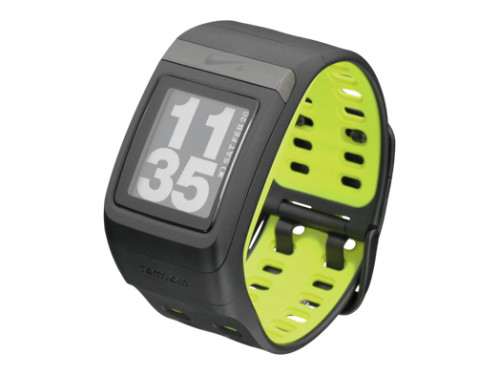
I loved the watch as soon as I opened the box. The design is sleek and looked much less bulky on my wrist than my Garmin. And when I plugged it into my computer (the USB is IN the watch, which I found convenient and cool) a screen popped up where I could set all my watch preferences. The entire process was extremely simple and user friendly.
In addition to GPS, this watch comes with a Nike+ Sensor foot pod. This is important because it means you can use the watch on the treadmill, and even better, you can start your run while the watch finds its satellites. I spent so many cold mornings hopping around waiting up to 30 minutes for my Garmin to find satellites. With this, you can start running right away and as soon as the watch finds satellites, the GPS will take over.
The next morning, I went out for my run. I didn’t set up my foot pod yet because I had a little foot pod holder (the Sensor itself fits inside Nike shoes, but if you don’t wear Nikes you can buy a little shoelace attachment case for it) but hadn’t unpacked it yet from my move.
I get asked a lot if the Nike finds GPS signal faster than the Garmin. The answer is no. It was exactly the same, but again, once you have the foot pod it doesn’t really matter. I got a signal and started my run.
The greatest thing about using the Nike+ watch after the Garmin is how easy it is to view your various stats during the run. With one simple button, I can easily switch from pace, to total time running, to speed, to the current time (this is HUGE, I never knew what time it was with my Garmin) – and easily get back to wherever I started. Speaking of that, using the Nike+ software on your computer, you can set your preferences for the two stats that default on the home screen. I keep the large stat my mileage and the smaller one on top (this is the one that changes as you press the button) my pace.
I never did any type of tempo or speed work with my Garmin because I found using it extremely complicated. My screen would always switch around to different views and I wasn’t always able to get it back where I wanted it. The touch bezel was temperamental and didn’t always respond, and the controls were not at all intuitive. But with this Nike+, if and when I decide to do some tempo runs or laps, I already know how easy it is. And I’m really excited about that!
But, me being me, of course I got a lemon. During my very first run, my mileage froze at 1.71 and the watch would not update after that. It was immensely frustrating, especially since I was so excited about this watch after my terrible Garmin experience. I got in touch with Nike+ over Twitter and they recommended a factory reset.
Considering I JUST GOT IT from the factory, I was annoyed, but I did what they said and I didn’t have that problem anymore.
The other lemon issue came when I tried using the foot pod sensor. My watch would not recognize that there was a foot pod. I tried everything I could in terms of syncing, and it just didn’t work. I found an old Nike+ sensor from a few years ago, though, and the watch recognized it right away. It turns out I received a dead sensor. A lemon. If you were taking bets (I’m looking at you Matt and Mal) you are probably a very rich person right now. And unfortunately, unless I return the entire watch (which I am not willing to do because I don’t want to be without it), Nike won’t send me a new one. Luckily I have that old one and hopefully it keeps working.
The sensor is really what catapults the Nike+ far ahead of the Garmin for me. I know some Garmins have a sensor, but it costs extra and doesn’t include all models. I know I mentioned this before, but being able to start my run out the door saves me so much time and being cold, and I feel so much happier to be running.
As far as accuracy goes, I know the sensor is generally not as accurate as a GPS, but my GPS kicks in so quickly that I don’t care. I can start my run and that’s all that matters.
After my run, I plug my watch right into the computer. I actually JUST bought another Garmin ANT stick because I couldn’t find mine, and then I found it so now I have two that I don’t need. I like that this watch itself plugs right in so I don’t have to worry about small pieces. After it syncs, I can view my route, splits, elevation, pace – everything I looked at with my Garmin software. I especially love how when I look at my route, I watch my run as it happens. A thick orange line traces my exact route as a counter on the side updates the elevation and pace at every single point of my run. It’s very cool!

[That orange line will move along the length of the gray line that shows my route, and on the right as the orange line moves along the route, that stat counter will update to show my run in real time]
As for battery life, WOW. With my Garmin, I had to keep it plugged in at all times or the battery would die within the day. If I forgot to plug it in, I couldn’t use it for my next run. And it went from 100% to dead while running a few times. The Nike+ battery is amazing. I keep my watch in my drawer and even after days, it doesn’t die. I can take it out of my drawer and run with it at any time. It also charges very quickly after a run.
The only true drawback of this watch that I’ve found is the one everyone complains about – it only records data for full miles. That means that if you run 3.5 miles, you only get data for 3. If you run 5.99 miles, you only get data for 5. I don’t understand how they could release a watch like this and I’m not sure of the reasoning, but I hope that in a future software update Nike decides to fix this. But like I said, that issue wasn’t enough to stop me from buying the watch and I generally don’t mind since I tend to run full miles anyway.
Of course, when I run a 10K on Saturday, I’ll probably be annoyed by this. But in general, it’s not that big a deal.
If you’re in the market for a new GPS watch, I highly recommend the Nike+ SportWatch GPS – even with the issues I had. No one else seems to get lemons the way I do, and the benefits of this watch — the ease of use, the battery, the look, the website data — are such a delight after my Garmin, and I am extremely happy with my purchase.
My Nike+ varies widely when it comes to find satellite. however, it’s improved with age and seems to find it much faster. I’ve never used the footpod, but I’d rather just start running than wait for it to find the connection. While it used to take almost a mile sometimes, lately it’s been almost instant.
As you know, the not counting splits for less than a mile drives me insane, especially for halfs and full marathons. WTF? But overall, I am pretty happy with it. The battery life is great. Nike needs to invest more in the online software, but it’s the best cheap gps option IMO!
What??? The non full miles doesn’t get data? That is crazy!! But I like everything else about it. I am pretty good with technology and I find the garmin very user unfriendly. I never was able to set intervals
What??? The non full miles doesn’t get data? That is crazy!! But I like everything else about it. I am pretty good with technology and I find the garmin very user unfriendly. I never was able to set intervals. The Nike looks so much better!!
I just got the Motorola one, and boy, did I get a lemon too? Cannot do the software update, so annoying.
Someone recommended that one to me! But I’m glad I went with the Nike. I agree how absurd it is about the non-full miles.. I’m just hoping they will fix it. It makes no sense!
My garmin 405 sucks. I hate it so much. I tried the Nike footpod about 3 years ago and didn’t like the interface or that you didn’t get splits. I assume that the software has been updated since then! I’m still using iPhone apps, because they start recording right away instead of waiting 20 plus minutes like my garmin.
Thanks so much for your review. It couldn’t have been better timed. I have been researching these for the last week. I was hellbent on the 405 until I read the abysmal reviews. This is the one I was leaning towards and you have further convinced me!
Thanks for checking it out for us, looks like it’s really a great GPS watch, to help me reach my running goals. mytravelfitness.com
I was an early adopter, got one of the first few hundred in the US. Most of my runs, i still take my phone and use the $3 Nike +GPS app, but I rely heavily on the watch for long runs and overall find it to be a huge improvement upon my old garmin.
The fact that it only records full miles bloggles my mind. So strange! Hopefully an update will fix that and then this watch will be PERFECT.
I also had a lot of problems with the Garmin 405. I think it has been thrown against the wall a few times. It completely broke and started doing long beeps on the shuttle on the way to the start line of my first marathon last year. I’ve done countless software updates and it works about 50% of the time. I spoke with the Garmin rep at the NJ Marathon last weekend and he basically told me the 405 gives everyone trouble and it is not their best model. I don’t need all of the functions the Garmin offers, I’ve never even used them! I am thinking of switching to the Nike watch as well. A friend of mine showed me his watch and how works and it looks awesome, comfortable and SIMPLE!
Wow, you sure did have a lot of problems with your Garmin! I haven’t had any issues like that with mine, however, mine is the Forerunner 110..a different model.
Glad you found a new watch that you are in love with!
So I think I’d be annoyed about the full mile thing but only if I plugged it into my computer (which I never do) — but, does it allow you to simply stop your watch at, say, 3.1 miles, and then see your stats (still on the watch)? Or does it erase data straight away? If I could just see the stats and plug them into Smashrun manually (instead of plugging it in via USB) that would be fine. I assume the watch isn’t so stupid that it would erase things completely, so I don’t mind manually typing some splits into my Smashrun database.
I like my Garmin 305, but the thing is huge. I actually found that sticking my watch in a window sill for 5 minutes as I get ready to walk out the door loads the satellites, but having the foot pod would eliminate that extra hassle. The physical look of the Nike watch is great — I much prefer to it any Garmin model out there!
Dori, I have the same exact experience with Garmin & Nike +. I felt really guilty about switching over to Nike because I had spent so much money on the Garmin. (Also, and not as importantly, it seemed like all serious runners relied solely on the Garmin.)
Nike+ has just worked wonders for me. It’s so easy to use and so accessible. I love their interface on the internet. So amazing!
I just purchased one of these the other day! I’m new to the running world, so I’ve never had/used one before, but I’m excited to try it out.
I have this watch, and I guess I never noticed the no-data-for-partial-miles thing! I just looked at my Nike+ stats, and it looks like partial data doesn’t come up under “splits” but does show under “laps” … unfortunately, though, I can’t remember if I had it set to auto-lap after a mile or if I was manually lapping. I’ll have to pay attention next time!
Your blog popped up when I was looking for others that loved their Nike+ GPS sport watch – but – had it inexplicably stop importing the run data. Plug it in – and it goes straight to charge mode, irrespective of computer (PC, MAC, OS version, etc.) sigh. Nike+ support has not been too supportive either. The only way to do a “factory reset” is to – guess what – plug it into the computer….but when that’s not working…sort of impossible.
On Garmin, the only reason to use a Garmin would be if you want to include both your bike and run stats on Strava – which won’t import. Nike+ and Strava are to different worlds today, same goal (compare times on the same route) but with a key difference – Strava doesn’t care what device you use – Nike does.
Here’s Nike+ when I did the CIM Marathon in Dec 2011
My Nike GPS turns itself OFF mid-run now…. really frustrated.
I ran with my bf’s Garmin last week and didn’t like it. I also found it confusing and thought it was just me.
How on earth can plastic cups be lemons???
I am failing to download the Nike+ connect software for my new Nike GPS Watch which is very frustrating
I downloaded to a Mac and it tells me its loaded successfully but wont launch when i put the watch in the usb
Anybody else had this – and does anybody know what the fix is??
Thanks in anticipation
Wayne
I must be doing something wrong. I bought the Nike+ with the sensor. I charged it fully and went for a run. I know that I “ended” my run. This morning my watch was completely dead. Any suggestions?
Though I think the interface is excellent, mine and many others’ watches have failed. Plan on throwing out the watch if this happens to you after the 1 year warranty expires.
Check out the 1 star Amazon reviews and the Facebook group devoted to this problem (http://www.facebook.com/pages/Nike-Sportwatch-GPS-problems/229596010396998).
Wow, thanks Mitch. Mine is having a new problem – the GPS turns itself off mid-run. Sigh..
quckqvpaoliw
snceostaykdv
fzqllwxrhnmv
Hello, I think your site might be having browser compatibility issues.
When I look at your website in Safari, it looks
fine but when opening in Internet Explorer, it has some overlapping.
I just wanted to give you a quick heads up! Other
then that, amazing blog!
Hey, have you seen that TomTom have released a new GPS running watch that is a standalone product and isn’t in conjunction with Nike? The UK launch is in September but I managed to get my hands on a cheeky sample and it is a pretty cool watch. It only took 15 seconds to find a GPS signal…which is the dream! Haha. Happy running!
Greetings from California! I’m bored to tears at work so I decided to check out your website on my iphone during lunch break. I enjoy the information you present here and can’t wait to take a look when I get home. I’m amazed at how fast your blog loaded on my cell phone .. I’m not even using WIFI, just 3G .. Anyways, good site!
Outstanding Website page I can definitely inltantsy motorola clutch system i465 black the rss when i can’t to find the e-mail enroll link as well as newsletter process. Execute possibly you’ve almost virtually almost any? Please make it feasible for personally understand to
Look great but far too bulky for my wrist. Great post Dori.
Found your blog this morning and glad I did. Great read Dori. Personally I’ve used the Nike+ SportBand in the past, until the battery died on me! I’m on the look out for a new device so I might give the SportWatch a go. Thanks again.
This is great! As you know I will be spending a LOT of time at the track this summer so this perfect! Still tryna figure out how to get the ice there!
This would be a great win!
Who can recommend to me the best broker among those in the list on this site?